Blog / Chevrolet Silverado 2500 HD

2026 Chevrolet Silverado 2500 HD Trailering Tech That Works Around Commerce City, CO

2026 Chevrolet Silverado 2500 HD Trailering Tech That Works Around Commerce City, CO

Alpine Chevrolet - 2026 Chevrolet Silverado 2500 HD Trailering Tech That Works Around Commerce City, CO

Heavy-duty towing is as much about confidence as it is about capacity. The 2026 Chevrolet Silverado 2500 HD builds confidence into every step of the process, from setting up your trailer profile to watching a near-seamless live view behind your rig on busy corridors near Commerce City. If your daily drive includes I-270, Highway 2, or worksite detours near the rail yards, a smarter camera system and a thoughtful in-cab trailering app can turn a complex towing day into a predictable routine.

In this guide, we highlight the Silverado 2500 HD trailering tech that genuinely solves everyday challenges—lining up on uneven gravel, keeping tabs on traffic when your trailer blocks the rear window, and verifying cargo in the bed without climbing up to double-check. It is the kind of tech that gets out of the way and simply helps.

What the camera system gets right

Up to 14 available camera views give you targeted angles for hitching, merging, and maneuvering. Hitch View provides a close-up line-of-sight to the ball so you can back up smoothly, while the available Transparent Trailer View is a standout—showing a near see-through look behind a compatible trailer. For long trailers that may otherwise overwhelm your side mirrors around Sable Boulevard or Vasquez Boulevard, that clarity is invaluable.

HD Surround Vision can assemble a bird’s-eye composite when you are threading through tight lots or staging areas. Bed View helps confirm strap placement or check a fifth-wheel connection point in seconds. It is the difference between guessing and knowing—especially helpful when wind gusts funnel across the open stretches east of town.

Trailering setup that saves time

The In-Vehicle Trailering App lets you create a unique profile for each trailer you tow—think enclosed work trailers, equipment haulers, or a toy hauler for weekend getaways. You can store weight and maintenance details, run through step-by-step pre-departure checklists, and monitor diagnostics to catch issues before they become delays. When your morning starts near the Sand Creek area and you are hustling to a job site off Brighton Boulevard, fewer steps and fewer surprises matter.

Another helpful element is the way the Silverado 2500 HD integrates the tech into the cabin layout. The available 13.4-inch diagonal touch-screen puts camera tiles and app controls within easy reach. You can toggle views, verify the hitch, and pull up guidance without sorting through complicated submenus.

Gas or diesel when your route changes daily

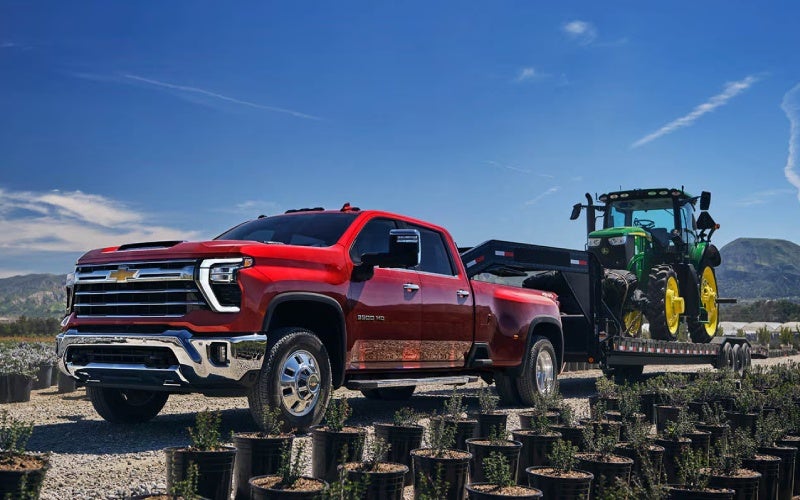
The 6.6L V8 gas engine brings 401 horsepower and 464 lb-ft of torque, paired with a 10-speed automatic transmission that feels composed at city speeds and on the highway. The available Duramax® 6.6L Turbo-Diesel V8 turns the dial to 470 horsepower and 975 lb-ft if your loads are heavy and frequent. With the right configuration, Silverado 2500 HD Crew Cab max towing reaches up to 22,070 lbs when properly equipped—a meaningful margin for equipment and materials common to Commerce City projects.

Because the transmission offers 10 closely spaced ratios, both powertrains stay in the optimal torque band more often. The result is steadier acceleration up on-ramps and more controlled downshifts on rolling grades toward the South Platte River bridges.

Why these features matter on Commerce City roads

Local routes can demand quick pivots—lane closures on I-76, a last-minute detour near the industrial corridor, or a tight alley at a delivery point. Transparent Trailer View and HD Surround Vision reduce second-guessing when space is short. Meanwhile, Trailer Side Blind Zone Alert—when equipped—extends coverage alongside your trailer, offering mirror-based alerts that add an extra layer when traffic bunches up around interchanges.

When your schedule runs long, interior details earn their keep. The available 12.3-inch diagonal Driver Information Center keeps tow/haul data front and center; Wireless Apple CarPlay® and Android Auto™ help you field jobsite calls and route updates cleanly. This is a truck built to work hard without adding friction to your day.

  • Hitch View: A close-up to align the ball and coupler more quickly
  • Transparent Trailer View: A near see-through look behind a compatible trailer
  • HD Surround Vision: Composite overhead views for tight spaces
  • Bed View: Confidence check for cargo, straps, and fifth-wheel points
  • Trailering App: Profiles, checklists, and diagnostics in one place

Each of these elements targets a common pain point. Together, they add up to fewer resets and smoother progress from job to job.

Frequently Asked Questions:

Can the camera views help with a fifth-wheel or gooseneck setup?

Yes. Bed View gives you a fast look directly into the bed to verify connection points and safety chains, and you can switch to additional angles to confirm alignment without leaving the driver’s seat.

Does Transparent Trailer View work with every trailer?

It works with compatible trailers and requires proper setup using the guidelines in the In-Vehicle Trailering App. Once configured, it can dramatically improve visibility behind longer trailers on multi-lane roads.

Is the In-Vehicle Trailering App difficult to learn?

It is designed to be straightforward. You build a profile for each trailer and can use checklists that reflect real-world steps—hitching, lighting checks, and more—so nothing gets missed when you are in a hurry.

How does the Silverado 2500 HD compare to other HD trucks for camera coverage?

With up to 14 available camera views, the Silverado 2500 HD provides extensive coverage, including Transparent Trailer View and Hitch View. While competitors offer useful systems, Chevy’s combination and integration across the touch-screen are a highlight for busy towing days.

What interior tech supports towing beyond the cameras?

The available 13.4-inch diagonal touch-screen and 12.3-inch diagonal Driver Information Center surface the right data where you need it. Wireless Apple CarPlay® and Android Auto™ keep communications simple without extra cords, and Chevrolet with Google built-in adds route, voice, and climate controls you can access hands-free.

In short, the 2026 Silverado 2500 HD’s trailering technology brings clarity and order to tasks that used to require more guesswork. If your schedule takes you from the wholesale district to active build sites and along wind-prone stretches near Commerce City, these tools serve as a real advantage, day in and day out. When you are ready to see how this tech fits your routine, our team can walk you through the camera views, set up a trailer profile, and talk configuration details that match your loads and routes. Thoughtful capability—supported by intuitive tech—is why this heavy-duty Chevy feels so dialed for Colorado work.

Alpine Chevrolet is proud to support Colorado drivers with trusted guidance on heavy-duty configurations and towing tech—serving Lone Tree, Aurora, and Commerce City with a straightforward, people-first approach.
Request more 2026 Chevrolet Silverado 2500 HD information

Posted in:

Related Posts

Diesel Towing Confidence for Denver, CO Hauls — How the 2026 Silverado 2500 HD Makes Big Loads Feel Small

Diesel Towing Confidence for Denver, CO Hauls — How the 2026 Silverado 2500 HD Makes Big Loads Feel Small

Alpine Chevrolet - Diesel Towing Confidence for Denver, CO Hauls — How the 2026 Silverado 2500 HD Makes Big Loads Feel Small The 2026 Chevrolet Silverado 2500 HD was engineered to turn muscular torque into everyday control, especially when the road tilts upward through Denver’s westbound climbs. With the available Duramax® 6.6L Turbo-Diesel V8 delivering 470 horsepower and 975 lb.-ft. of torque, this truck is built to pull with authority—and to do it smoothly. But what really separates the Silverado HD is how its trailering tech works together to make hitching, backing, and lane changes feel natural. If you tow equipment to job sites along I-25 during the week and hook up a fifth-wheel for weekend getaways, this truck’s power and smart visibility tools can simplify every step. Let’s break down the diesel advantage, the camera views that matter most, and a few setup tips we share with customers who want their Silverado 2500 HD to feel dialed in on day one. If you are comparing to other heavy-duty pickups, pay attention not just to tow numbers, but to how confidently a truck helps you use that capacity—mile after mile, hill after hill. Why diesel torque changes the towing equation Torque isn’t just a spec sheet brag—it’s the immediate shove that gets you and your trailer moving cleanly, especially from a stop on an incline or when you need to merge briskly. The available Duramax® 6.6L Turbo-Diesel V8 brings 975 lb.-ft. of torque and pairs it with a well-matched 10-speed automatic that holds gears smartly on grades. Around Denver, where ramps can be short and traffic gaps can close quickly, that smooth, early torque helps you merge with fewer revs and less stress. The transmission’s spread of ratios keeps you in the heart of the Duramax® power band, which is exactly where you want to be when you’re pulling a heavy load up a long grade or easing down a descent with steady control. That harmony between engine and gearbox makes the Silverado HD feel planted and predictable—two qualities that go a long way when you are towing near the foothills or threading eastbound traffic on I-70 after a job. Camera views that make trailering easier When people first use the Silverado HD’s up to 14 available camera views, the reaction is usually the same: that was easier than expected. The system goes well beyond a single reverse angle to deliver useful perspectives when you’re setting up your hitch, backing into tight job sites, or checking your trailer’s position in a crowded lot. Hitch View: Gives you a close-up of the receiver so you can line up precisely without guesswork. Transparent Trailer View: Uses cameras and software to virtually “see through” a compatible trailer—excellent when changing lanes. Bed View: Provides a high, wide look at the cargo bed for fifth-wheel or gooseneck alignment and quick cargo checks. HD Surround Vision: Creates a stitched, overhead-like view to help you judge curbs, posts, and obstacles at low speeds. The benefit in Denver’s mixed urban and highway driving is real. Hitching becomes a one-person job. Parking near job sites off Federal Boulevard is less stressful. And on I-25, Transparent Trailer View brings welcome confidence when moving over with traffic alongside. Trailering App: your digital co-pilot The Silverado HD’s In-Vehicle Trailering App centralizes the steps many owners track on paper or from memory. Create a custom trailer profile—bumper pull, fifth-wheel, or gooseneck—and let the system guide your setup with pre-departure checklists. You can monitor tire pressures on compatible trailer TPMS, reference your light check, and keep your routine consistent across multiple trailers. It’s a small change that leads to fewer missed steps and a smoother start, whether you’re leaving a downtown site or a storage yard near the South Platte. Durabed capacity that pays off daily Even when you are not towing, the Silverado HD’s Durabed brings more cargo volume than any competitor—83.5 cu. ft.—and 12 standard tie-downs rated at 500 lbs. per corner. Toss in the available Multi-Flex Tailgate for a full-width step or a handy work surface, and you get weekday productivity that transitions cleanly to weekend convenience. If your gear mix changes daily—ladders and bins midweek, coolers and bikes on Saturday—the Durabed’s space and tie-downs make quick work of it. Real-world setup tips we share with HD owners Match the hitch: Choose the right class and drop height for a level trailer; confirm torque specs on mounts and balls before the first tow. Dial in mirrors: Power-extend vertical trailering mirrors help; set the upper and lower panes to cover blind spots alongside your trailer. Use camera presets: Save the views you rely on most—Hitch, Surround, and Transparent Trailer—so they’re one tap away. Run the checklist: Build a trailer profile in the Trailering App and follow the pre-departure steps every time—even for short hops. Consistency beats guesswork. When you standardize your pre-trip routine, your first mile feels calmer and you catch small issues—like a loose strap—before they become problems on Santa Fe Drive or C-470. How the Silverado 2500 HD stacks up for Denver drivers Plenty of heavy-duty trucks can post a big tow number. What wins the day in metro Denver is how gracefully a truck helps you use that capacity in tight spaces, through traffic surges, and on steep ramps. With up to 14 available camera views, the In-Vehicle Trailering App, and available Trailer Side Blind Zone Alert that extends the blind zone to include a compatible trailer, the Silverado 2500 HD lines up practical tools you will use every day. Add the available Duramax® 6.6L Turbo-Diesel V8 and the confidence of a 10-speed automatic, and you get a package that makes heavy loads feel smaller—without sacrificing control. As a quick reminder, Silverado 2500 HD also offers segment-leading maximum Crew Cab towing capability of 22,070 lbs. when properly equipped. Pair that with thoughtful visibility tech, and you have a smart match for Denver’s busy interchanges and weekend mountain escapes. At Alpine Chevrolet, we walk customers through diesel versus gas choices, axle ratios, camera packages, and hitch hardware so your truck is set up correctly for your specific trailer and routes. If you are carrying equipment across town during the week and heading west for fresh air on Saturday, our goal is to help you build a Silverado HD that feels ready from day one—no guesswork required. We are proud to be serving Commerce City, Denver, and Arvada with guidance that’s grounded in local conditions and hands-on experience. If you are comparing trucks or just starting your research, stop by to see how these features look and feel in person. Once you try the camera views, run through a Trailering App checklist, and feel the diesel’s low-end pull, you will understand why so many Colorado owners trust the 2026 Silverado 2500 HD for real work and real life. Frequently Asked Questions: Do I need the diesel for towing around Denver? The available Duramax® 6.6L Turbo-Diesel V8 provides maximum torque and is ideal for heavier trailers, high-altitude grades, and frequent towing. The 6.6L V8 gas engine is an excellent choice for moderate loads and mixed daily use—our team can help you decide based on your trailer weight and routes. Which camera views should I prioritize first? Start with Hitch View for alignment, Transparent Trailer View for lane changes, and HD Surround Vision for low-speed maneuvering around obstacles. You can add more views as you get comfortable. How does the In-Vehicle Trailering App help on quick trips? Even short tows benefit from the app’s pre-departure checklist and saved profiles. You can confirm lights, securement, and TPMS (if equipped) quickly so you leave with confidence—no skipped steps. What about bed capacity when I’m not towing? The Durabed offers 83.5 cu. ft. of volume and 12 standard tie-downs, making it easy to load gear during the week and reconfigure for weekend use. The available Multi-Flex Tailgate adds a full-width step and a convenient work surface. Request more 2026 Chevrolet Silverado 2500 HD information

Which heavy-duty truck has smarter trailer cameras for Denver, CO drivers comparing Silverado 2500 HD and Super Duty F-250?

Which heavy-duty truck has smarter trailer cameras for Denver, CO drivers comparing Silverado 2500 HD and Super Duty F-250?

Alpine Chevrolet - Which heavy-duty truck has smarter trailer cameras for Denver, CO drivers comparing Silverado 2500 HD and Super Duty F-250? When you’re towing in the city, threading through tight trailhead parking, or merging onto the highway with a full load, the question that keeps coming up is simple: which heavy-duty pickup gives you the smarter camera tools to make trailering feel easier? For Denver, CO drivers weighing Chevrolet and Ford, the story centers on the Silverado 2500 HD’s deep camera suite and how it pairs with trailering tech you’ll actually use every day. Chevrolet built the Silverado HD’s trailering ecosystem around visibility and workflow. With up to 14 available camera views, you get a 360-degree perspective, Hitch View for alignment, Bed View to check a fifth-wheel or gooseneck, and the standout Transparent Trailer View that can virtually let you “see through” a compatible trailer. That last feature changes your confidence in traffic and on narrow streets. It’s paired with an In-Vehicle Trailering App that organizes trailer profiles, maintenance reminders, and pre-departure checklists—all in the main display so you’re not hunting through submenus while a spotter waves you back. What about the Ford Super Duty F-250’s trailer tech? Ford’s Super Duty F-250 offers a robust toolkit as well, including available 360-degree cameras, Pro Trailer Hitch Assist, and Pro Trailer Backup Assist. Those systems can be helpful if you’re new to reversing a trailer or frequently swap between different trailers. The difference is that Chevrolet’s approach emphasizes continuous awareness and simplified setup through the app and those specialized views like Transparent Trailer View. When you’re towing on winding roads, in rush-hour traffic, or making sharp turns into alleys near job sites, being able to monitor what’s happening beside and behind your trailer in multiple perspectives can be the deciding factor between a smooth day and a stressful one. Beyond startup and parking-lot maneuvers, the Silverado 2500 HD’s camera tech shines as speeds rise. Transparent Trailer View helps with lane changes, while Bed View confirms your fifth-wheel connection is riding just right over expansion joints or bridge seams. Combine this with Trailer Side Blind Zone Alert and you get a clearer sense of vehicles pacing you in adjacent lanes. Ford counters with strong driver-assistance features, but the Silverado’s layered visual context delivers a unique advantage, especially on crowded arterials and during quick merges. How the screens and controls factor into daily towing Interface matters when you’re managing a trailer. The Silverado’s available 13.4-inch diagonal touch-screen and 12.3-inch diagonal Driver Information Center make it simple to switch among camera views, check trailer profiles, and use maps without bouncing through multiple menus. Chevrolet with Google built-in further streamlines daily workflows—voice-set destinations, find diesel stations nearby, and mark service stops with natural voice commands. Ford’s SYNC 4 is capable, but Chevy’s layout tends to put towing tasks a click or two closer, which makes a big difference when you’re rolling. The Silverado HD’s available trailering mirrors also play a pivotal role. Their power-extend function and camera integration complement the on-screen views, enhancing the picture you have of traffic beside long trailers and on curving on-ramps. It’s a complete visibility system, not a single feature. Real-world Colorado use cases If your week looks like early-morning equipment drops, mid-day freeway stints, and after-hours gear runs, the Silverado’s camera suite helps in specific ways. Backing a trailer into a tight yard or angled driveway? Hitch View and Transparent Trailer View limit guesswork and reduce the need for a second spotter. Navigating downtown job sites with cones and pedestrians? Surround views give you a margin of safety. Leaving for a weekend with a fifth-wheel camper? Bed View and the In-Vehicle Trailering App make pre-departure checks faster and more consistent—ideal when you’re packing, wrangling kids, and confirming torque specs in one go. Hitching alignment: Hitch View centers the receiver and ball so you can connect without repeated back-and-forth. Highway lane changes: Transparent Trailer View helps you verify space next to and behind long trailers. Fifth-wheel checks: Bed View quickly confirms pin height and bed clearance at a glance. Urban maneuvering: Surround views help you avoid curbs, pallets, and tight dock corners. Repeatable setup: The In-Vehicle Trailering App stores trailer profiles so settings are right every time. Of course, technology only helps if the underlying hardware is up to the task. The Silverado 2500 HD backs its camera and software advantages with a strong chassis, a 10-speed automatic, and two muscular engines—headlined by the available Duramax® 6.6L Turbo-Diesel V8. That pairing makes it easier to maintain steady speed on rolling grades and to modulate throttle smoothly during precision maneuvers where abrupt inputs can complicate a perfect hitch alignment. Frequently Asked Questions: Does Transparent Trailer View work with any trailer shape or size? Transparent Trailer View requires a compatible trailer setup and proper calibration. Most box-style trailers and many campers can qualify when configured per Chevrolet guidelines. Your advisor can help confirm compatibility and demonstrate the view in person. How does the Silverado’s In-Vehicle Trailering App help day to day? It centralizes trailer profiles, checklists, and maintenance logs in one place. That means you can switch between a landscape trailer and a fifth-wheel with settings saved, reducing the chance of a missed light check, brake gain mismatch, or tire-pressure oversight. Is Ford’s Pro Trailer Backup Assist better for beginners? It can shorten the learning curve for reversing, especially if you’re new to trailer dynamics. That said, many drivers find the Silverado’s combination of multiple camera views and intuitive screen prompts delivers a natural, confidence-building experience without relying on automated steering inputs. Do I need the diesel to maximize camera benefits? No. Camera views and trailering tech help regardless of engine choice. The diesel shines for sustained grades and heavy loads, but the gas V8 paired with the 10-speed still gets significant visibility and setup advantages. If you’re prioritizing the smartest, easiest-to-use trailering camera technology, the Silverado 2500 HD makes a compelling case. Its integrated approach—anchor views like Hitch View and Bed View, plus the unique Transparent Trailer View and an organized trailering app—helps reduce the friction points that often make towing stressful. For drivers and crews serving Commerce City, Denver, and Arvada, that translates to faster setups, safer merges, and greater confidence across the Front Range. When you’re ready to test these features back-to-back, Alpine Chevrolet can walk you through each camera view and help you configure a trailer profile so you see how it all works before you even leave the lot. Request more 2026 Chevrolet Silverado 2500 HD information

2026 Chevrolet Silverado 2500 HD Trailering Camera Views for Lone Tree, CO Drivers

2026 Chevrolet Silverado 2500 HD Trailering Camera Views for Lone Tree, CO Drivers

Alpine Chevrolet - 2026 Chevrolet Silverado 2500 HD Trailering Camera Views for Lone Tree, CO Drivers If you tow around Lone Tree, CO—whether it is a travel trailer for Chatfield State Park or equipment for a job north along C-470—you know confidence comes from visibility. The 2026 Chevrolet Silverado 2500 HD brings an advanced camera ecosystem designed precisely for those tight merges, long blind spots, and close-quarters backing scenarios. Up to 14 available camera views work together to help you connect, check, and maneuver more intuitively, and when you pair them with the available In-Vehicle Trailering App, your Silverado turns into a towing command center that is surprisingly easy to use. Transparent Trailer View and Why It Matters Transparent Trailer View is one of those features that sounds like a gimmick until you try it. With a compatible trailer and proper setup, the system uses camera feeds and smart processing to create the effect of “seeing through” the trailer behind you. On southbound I-25 near Lincoln Avenue or when you are threading past cyclists along RidgeGate Parkway, this view helps uncover traffic hiding directly behind your trailer—often the blind spot that creates the most anxiety. It is especially helpful with enclosed trailers and tall RVs where a traditional mirror view falls short. Setup is straightforward. You will select your trailer type in the In-Vehicle Trailering App, confirm lengths, and position the auxiliary camera as instructed. Once active, Transparent Trailer View appears on the center display, giving you a wider, more confident picture. For Lone Tree drivers who split time between city errands and weekend road trips, being able to check the lane behind your trailer in a single glance is a real stress reducer. Hitch View and Bed View—Hookups Without Guesswork Hitch View might be the single biggest time saver for frequent hitchers. Instead of the old trial-and-error approach, the system delivers a close-up of the hitch area on the center screen. Line up, inch back, connect—done. If you run a fifth-wheel or gooseneck, Bed View adds another layer of precision by showing the bed and hitch area, right where you need to see it. In busy Lone Tree lots around Park Meadows, where space is tight and foot traffic is constant, that accuracy matters. These views are not just about convenience—they help reduce the chance of bumping into the coupler, denting a bumper, or misaligning a pin box. The cameras also make solo hookups easier, so you do not have to rely on shouted directions or guesswork. Over time, that confidence adds up, whether you hitch daily for work or only a few times each summer. Surround Vision and Side Blind Zone Support for Towing The available HD Surround Vision system provides a bird’s eye composite that helps you visualize the truck’s perimeter—a major advantage in crowded trailhead lots and neighborhood cul-de-sacs. It works in concert with other towing-oriented aids like Trailer Side Blind Zone Alert, which can extend visual warnings to help account for trailer length when you change lanes. Think of that squeeze on C-470 during afternoon traffic—having a clearer picture around the truck and trailer helps you stay ahead of closing gaps and sudden lane shifts. These features integrate naturally into the Silverado’s 13.4-inch diagonal display, where you can toggle among camera views without digging through complicated menus. The layout is driver-centric, so you keep your attention where it belongs. When combined with the 12.3-inch diagonal Driver Information Center, the Silverado 2500 HD makes it easy to keep tabs on speed, trailer gain, and distance to the vehicle ahead without sensory overload. Make the Most of the In-Vehicle Trailering App Chevrolet’s In-Vehicle Trailering App deserves attention on its own. Beyond camera views, it lets you build custom trailer profiles, run through step-by-step pre-departure checklists, and keep a clear record of key trailer data. That is helpful when you alternate among multiple trailers—for example, a utility trailer during the week and a camper on the weekends. Each trailer can have its own profile with lengths, weights, and test status saved for quick access. If you tend to prepare the night before you head into the foothills, this app helps you stay organized. The checklist makes sure brake lights, connections, and tire pressures are verified, and it is all visible on the big screen without fumbling with paper or phone apps. Over time, this reduces errors and helps you settle into a repeatable routine—exactly what you want before pulling onto the highway. Real-World Tips for Lone Tree Towing Dial in mirror strategy: Use the power-extend trailering mirrors with camera views to cover both the trailer flank and the lane behind you. Pre-set profiles: Save a unique trailer profile for each trailer you tow to speed up setup and maintain consistent settings. Practice in a lot: Use HD Surround Vision and Hitch View in an empty area to build muscle memory before a busy weekend trip. Use Bed View for checks: Quick glances at cargo straps or a gooseneck connection can catch issues before they become problems. Leverage Transparent Trailer View: On multi-lane roads, toggle this view before lane changes to help clear the blind spot behind your trailer. Local towing involves more than highway miles. You will ease through school zones, negotiate retail corridors, and back into tight driveways. That is why the Silverado 2500 HD’s camera suite is so valuable. It complements Lone Tree’s mix of suburban roads and regional connectors by letting you scale visibility up or down to match the moment—backing slowly, checking cargo, merging assertively, or scanning for pedestrians. The cameras do not do the driving, but they take away guesswork that used to make towing feel tense. For drivers who want hands-on help getting started, our team can walk you through camera setup, trailer profile creation, and best practices. We will even help you compare how different trims support the towing tech you need most—many of the views and the In-Vehicle Trailering App are available across the lineup, so you do not need to guess which configuration fits your routine. It is all about building confidence from day one. Frequently Asked Questions: Which camera views are most useful for first-time towers? Start with Hitch View for easy alignment, then add HD Surround Vision for close-quarters maneuvering. If you tow an enclosed trailer, Transparent Trailer View becomes especially helpful during lane changes. Do I need special equipment for Transparent Trailer View? You will need a compatible trailer and the appropriate camera setup. The In-Vehicle Trailering App will guide you through calibration so the composite image lines up correctly. How do the trailering mirrors work with the cameras? The power-folding and -extending vertical trailering mirrors expand your field of view, while the available camera views help fill in blind spots the mirrors cannot cover, providing a layered visibility strategy. Can I save different settings for multiple trailers? Yes. Build a custom profile for each trailer with the In-Vehicle Trailering App. You can store dimensions, checklists, and test results to streamline future hookups. Whether you are dialing in a new fifth-wheel or refining your utility trailer routine, Alpine Chevrolet is ready to help you get the most from the 2026 Chevrolet Silverado 2500 HD’s trailering technology. We are proud of how these features support safer, more confident towing for Lone Tree residents and our broader community, serving Arvada, Lone Tree, and Aurora. If you want a quick walkthrough before your next trip, our team will set you up for success. Request more 2026 Chevrolet Silverado 2500 HD information